1. Getting started
Play instantly, no sign-up
Press 🤖 Play with AI on the home screen and a game starts immediately — no registration. A guest account is created automatically and you play against 4 AI players right away.
Note that guests do not keep records, win rates, rankings or trophies. When the hand ends, nothing is saved.
What changes when you sign up
| Feature | Guest | Member |
|---|---|---|
| Play with AI | ✅ | ✅ |
| Records · win rates · per-role stats | — | ✅ |
| Rankings · trophies · tiers | — | ✅ |
| My game replays | — | ✅ |
| Solino Chance · event rewards | — | ✅ |
Tap the "Sign up and keep your records" card at the top of the home screen to open the sign-up window. You can register with a social account, or add one later via account linking.
2. The home screen at a glance
From top to bottom the home screen is laid out like this. On mobile, a bottom tab bar switches between Hall of Fame, recent results, the guide and settings; on desktop the same content shares one screen.
| Area | What it shows |
|---|---|
| Profile | Your tier, trophies, record and Solino Chance count (guests see a Sign up and keep your records card instead) |
| 📋 Board | Notices and suggestions |
| 🤖 Play with AI | Start instantly against 4 AI players |
| 🎮 Games in progress | Live tables. Click to wait means you can join |
| 🏆 Ranking | Today's, this week's and all-time point leaders |
| 🎉 Ongoing events | Attendance, milestones and other progress |
| 📊 Total games | Lifetime and today's game counts |
| Bottom tab bar | Home · Hall of Fame · 🕒 Recent results · ❓ Guide · ⚙️ Settings — Hall of Fame holds monthly record leaders, recent results shows big hands (±40 points or more) |
| 📜 My game replays | Rewatch hands you played (signed-in members) |
3. Starting a game
① Play with AI — solo, instantly
🤖 Play with AI → pick your options in the confirmation popup and press [Start].
- Allow others to replace an AI — when checked, another user may take over an AI seat mid-game. Uncheck it if you want a quiet solo game.
- Use Solino Chance — appears only when you own a voucher. Using one starts the hand with a dream deal: the Mighty + the Joker + 5 trumps.
② Join a game in progress
In the 🎮 Games in progress list, tap a table marked Click to wait to queue for the next hand. You join as soon as the current hand ends and a seat opens.
4. Reading the game screen
How to read the table
Below is a real game screen. Almost everything about the current hand is in this one shot.
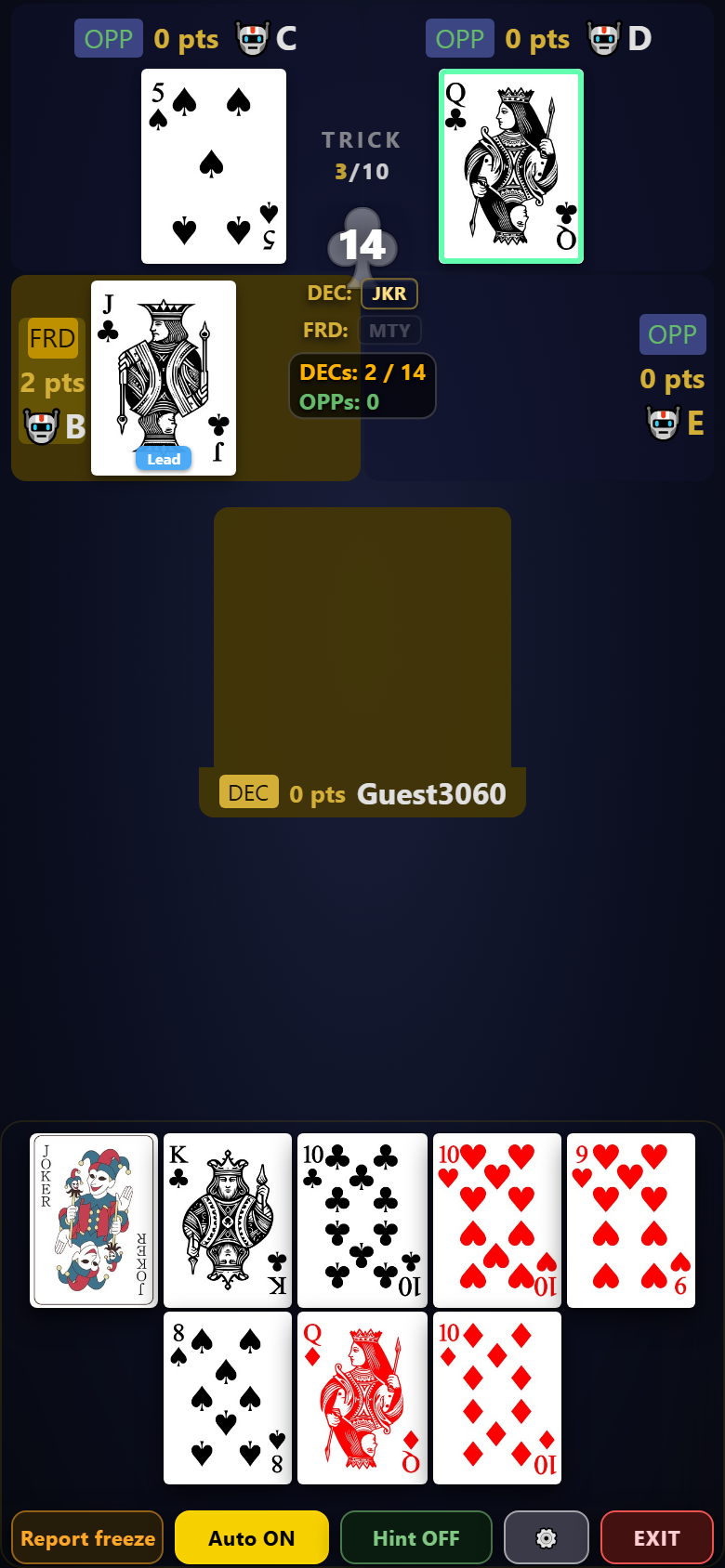
Teams are color-coded
- Declarer's team (declarer & Friend) — gold background. The declarer is slightly darker, the Friend lighter. The Declarer / Friend badges next to their names are gold too
- Defenders — indigo background with a blue Defender badge
- Until the Friend is revealed, their seat shows Unknown. The moment the Friend card hits a trick, that seat turns gold — so just watching the background colors tells you who the Friend is
Center — the contract and the team's key cards
The big suit symbol and number in the middle of the screen are the trump suit (giruda) and the contract. The two lines beneath them are the key.
- Declarer: the Mighty / Joker the declarer is known to hold
- Friend: the Friend card, and the Mighty / Joker the Friend holds
Cards are shown by shorthand.
| Label | Meaning |
|---|---|
| MTY | the Mighty (♠A — or ◆A when spades are trump) |
| JKR | the Joker |
| Gir.K | the King of trumps |
| Solo | the declarer plays alone, without a Friend |
Below that, DECs ○ / contract and OPPs ○ are the points collected so far. When the declarers' number reaches the contract, the declarer's team wins. Points not yet decided show as Pending.
Your hand and trick progress
- Your hand is at the bottom. The system enforces the rules automatically and dims cards you cannot legally play, so just tap any bright card. In the screenshot, the ♠8 and ◆Q on the lower row are dimmed for exactly that reason
- Card borders — green marks the current boss card (the strongest card still winning the trick). In the screenshot, D's ♣Q has the green border
- The TRICK 3/10 indicator at the top tells you which of the 10 tricks you are on
- The number next to your name is the points you have taken so far
Bidding
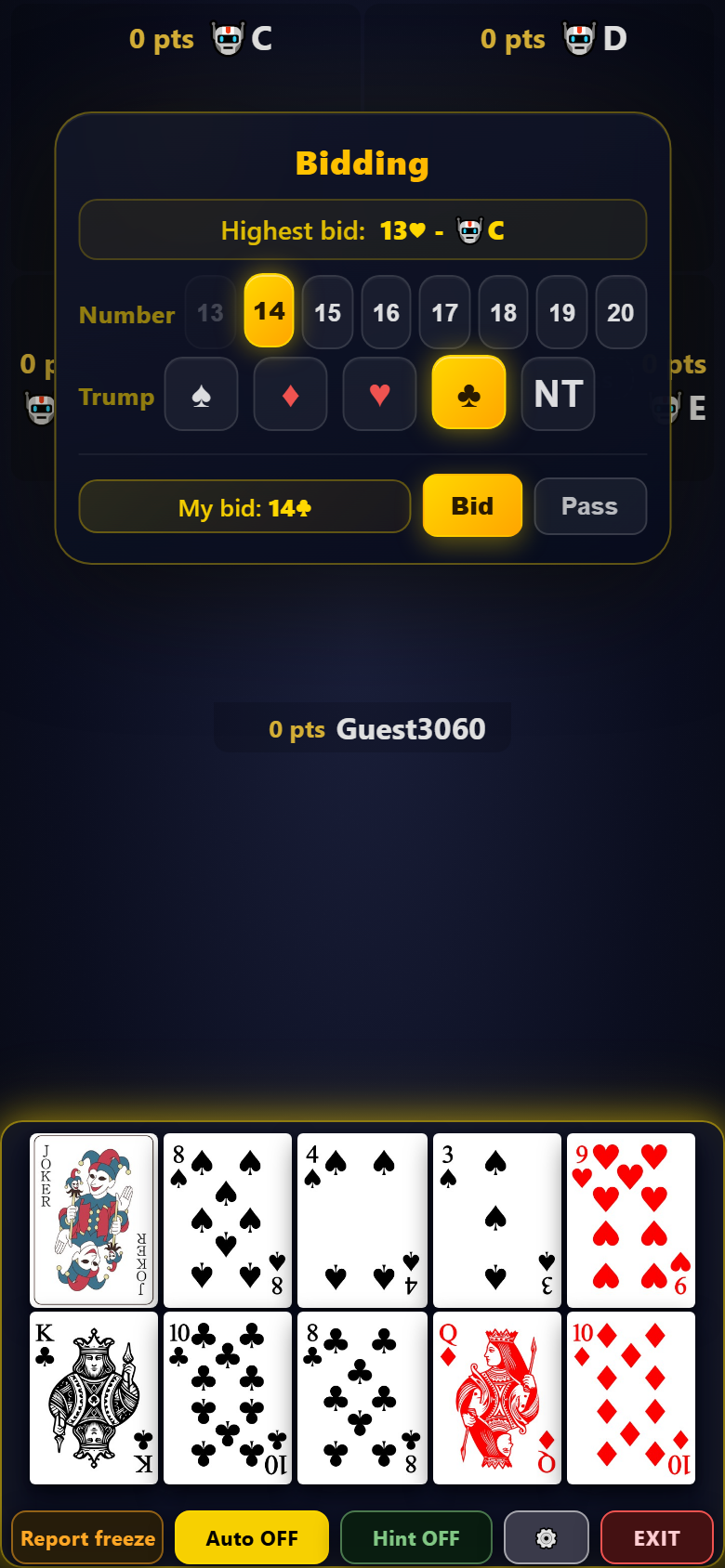
- Number — the points you promise to take, from 13 to 20. The higher you bid, the likelier you become declarer, but the heavier the burden
- Trump (giruda) — the suit you want as trump. NT means no-trump
- My bid — previews your chosen combination, e.g. 14♣. Press Bid to confirm
- Not confident? Pass. Even after passing, you get another turn if someone bids higher before you
- You can only bid higher than the current highest bid. If no one has bid yet, it shows None
Time limits apply only when playing with humans. In a game with human players, you auto-pass after 40 seconds, with a warning at 10 seconds left. Solo games against AI have effectively no limit, so take your time.
When you become declarer ① The exchange
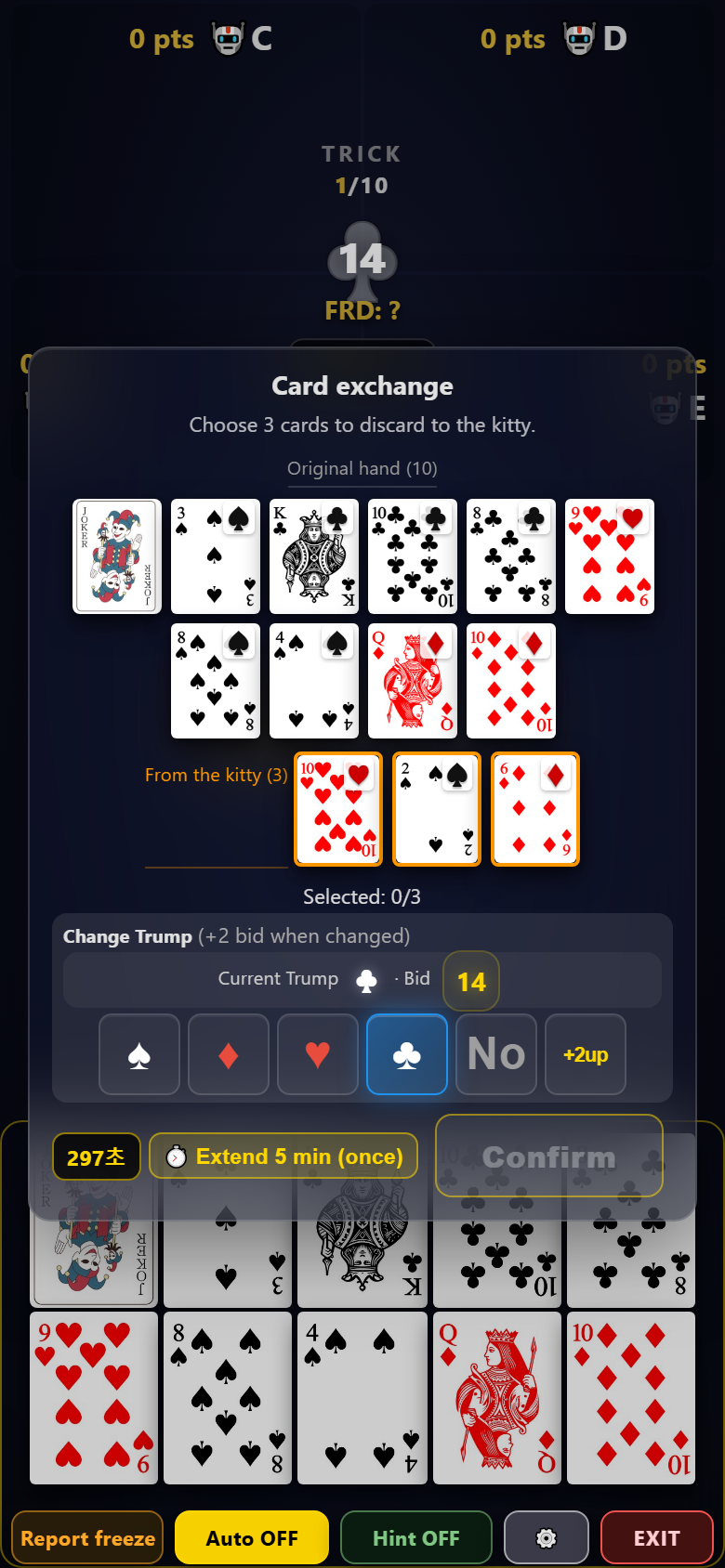
- The 3-card kitty is added to your 10 cards, giving you 13. The 3 new cards are marked with an orange border
- Tap 3 cards to discard. Your progress shows as Selected: n/3, and Confirm activates once all 3 are chosen
- Point cards among your 3 discards still count toward the declarer's team score. If you cannot protect a point card, discarding it is safer than holding it and losing it to the defenders
You get 5 minutes for the exchange, plus one 5-minute extension. The remaining time is shown at the bottom of the screen in seconds.
When you become declarer ② Calling the Friend
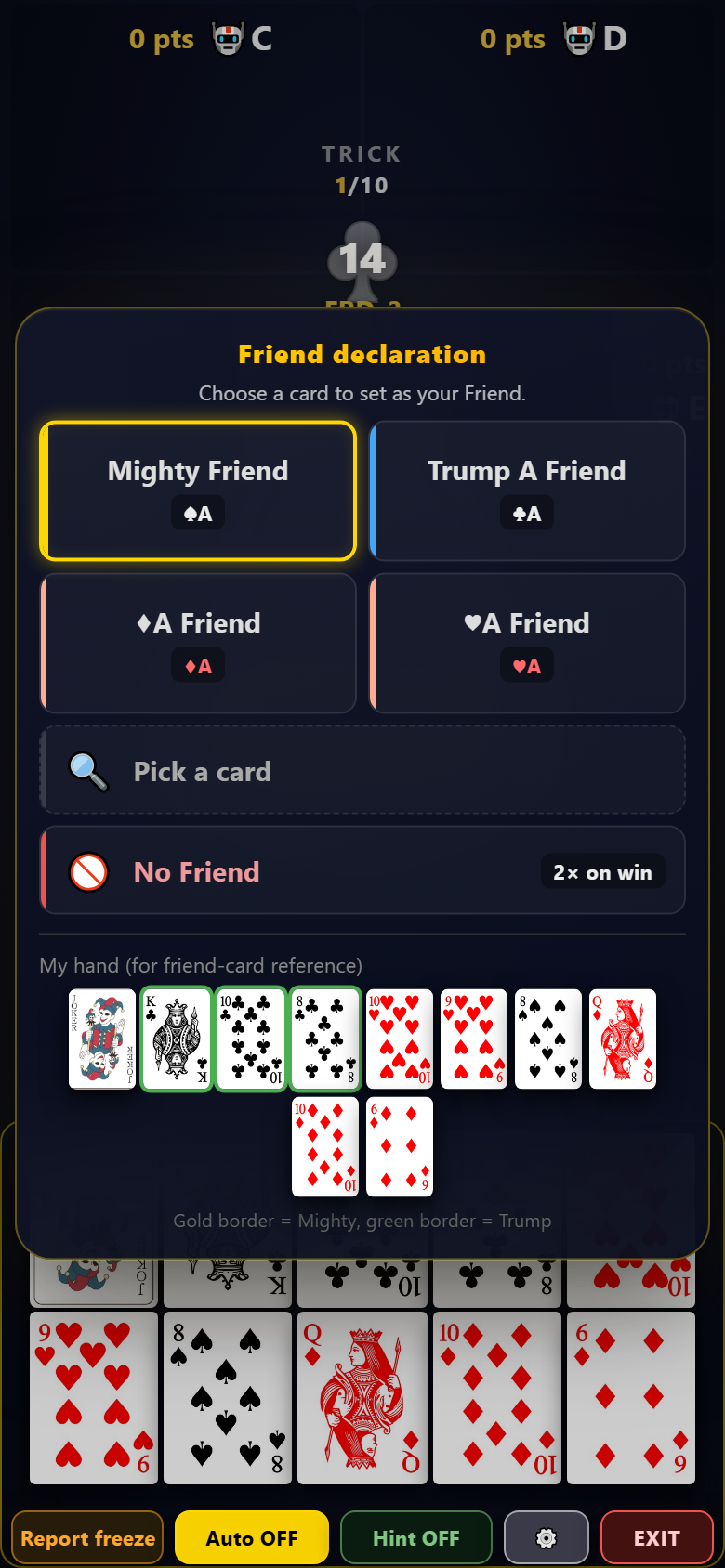
You choose your partner by card, not by person. Whoever holds that card becomes your Friend, and nobody knows who the Friend is until that card is played to a trick.
- Common calls like Joker friend · trump-A friend · trump-K friend are one-tap buttons
- For anything else, use 🔍 Pick a card to choose a suit and rank
- If you call a card you already hold, you are effectively playing alone. Check your hand before deciding
Your hand is shown at the bottom for reference. A gold border marks the Mighty, green marks trumps — look at what you hold, and call the card you are missing as your Friend.
The Joker
When you lead the Joker, you declare a suit ("Hearts!", "Spades!" and so on). If a Joker call forces the Joker out, a special animation shows it.
Utility buttons (bottom of the screen)

| Button | What it does |
|---|---|
| Auto | Lets the AI play your turns. Shows Auto ON while active |
| Hint | Shows a recommended card |
| ⚙️ Settings | Post-trick delay, emoticon position, language |
| Report freeze | If the screen seems stuck, press it and the server attempts recovery |
| EXIT | Leave the room |
Auto is not just for stepping away. When the outcome is already decided and only mechanical mop-up remains, turn it on and the AI will finish the remaining tricks for you. Handy for skipping through the last few tricks once the contract is clearly made or broken.
You can communicate with other players using emoticons.
· In games with human players, 30 seconds of no response means the AI takes over and you receive a penalty. Turn on Auto before stepping away.
· Leaving does not end the game. The AI plays it out, and the result counts toward your real score.
5. After the game
Scoring
Each hand's gains and losses go straight into your points. On top of that:
- Win-streak bonus — consecutive wins multiply your score (2 in a row ×1.5, 3 in a row ×2 …)
- Run / back-run streak bonus — stacks the same way
- Redeal multiplier — hands that followed an all-pass or auto redeal are multiplied accordingly
The result screen shows it as base ○ + bonus ○ = total.
Tiers and trophies
Your tier is decided by trophies, not points.
| Tier | Trophies |
|---|---|
| 🌱 Sprout | 0 – 9 |
| 🥉 Bronze | 10 – 49 |
| 🥈 Silver | 50 – 99 |
| 🥇 Gold | 100 – 149 |
| 💠 Platinum | 150 – 199 |
| ♤ Mighty | 200+ · advances every 200 |
The Mighty tier steps up every 200 trophies — Single 200 · Double 400 · Triple 600 · Quadruple 800 · Grand 1000+. See where you stand under Lifetime details → ⓘ Tier guide in your home-screen profile.
Trophies are awarded through ranking settlements.
- Daily — awarded to ranks 1–10 at midnight (KST) each day. Requires 3+ games that day
- Weekly — awarded to ranks 1–10 at midnight (KST) on Mondays. Requires 20+ games that week
Points reset every Monday, but trophies accumulate for life and are never deducted.
Replays
📜 My game replays lets you rewatch any hand you played, trick by trick — including why the AI played each card.
6. Solino Chance and events
Solino Chance
A voucher that starts one hand with a dream deal: the Mighty + the Joker + 5 trumps.
- Earn 1 voucher per 20 AI games (progress shown in the AI start popup)
- After using one, there is a 30-minute cooldown
- If the game falls apart mid-hand, the voucher is refunded automatically
Standing events
| Event | Condition | Reward |
|---|---|---|
| Attendance | 30 games a day, 7 days | Solino Chance +3 and up (grows each consecutive week, max 7) |
| 5,000 lifetime games | your personal total | Solino Chance +10 |
| Reaching Mighty ② or higher | 400+ trophies | Solino Chance +20 |
Track your progress under 🎉 Ongoing events on the home screen.
7. Troubleshooting
| Situation | What to do |
|---|---|
| The screen seems frozen | Press Report freeze at the bottom. If that fails, refresh with F5 — the game continues where it was |
| Buttons will not respond | Refresh with F5. You return to your hand in progress automatically |
| I need to step away briefly | Turn on Auto. In a game with humans, leaving it means AI takeover + a penalty after 30 seconds |
| The AI played a strange card | 🐛 Report this game — the developer actually reviews the replay and fixes it |
| I found a masterpiece game | 🏆 Recommend as showcase in My game replays — it becomes a master-replay candidate. Requires the Mighty tier (200 trophies) or higher |
| Do I need to install an app? | No. It runs right in your PC or mobile browser |
| Does it cost money? | Everything is free. There are no paid features |